This guide is for the free demo: one candidate, the full pipeline, forever — 25 drafts + 5 sends per rolling 30 days, enforced in code, the identical wheel the paid tiers run. No card, no account, no telemetry: the download IS the product.
1 Download, then prove the bytes
Two files: the pack and its signature hash. Check the download matches the hash before installing — if it ever differs, you did not get our file:
# Linux / Mac — in the folder you downloaded to:
sha256sum -c hunta-demo-1.0.0.zip.sha256
hunta-demo-1.0.0.zip: OK

# Windows PowerShell:
(Get-FileHash hunta-demo-1.0.0.zip).Hash -eq (Get-Content hunta-demo-1.0.0.zip.sha256).Substring(0,64)
True
Expected digest: 1d61c7566916266b8db510333364b6d0cf8079c1cc7b62d5a7c6e178b404edeb
2 Install (Python 3.11+)
unzip hunta-demo-1.0.0.zip -d hunta-demo && cd hunta-demo
python3 -m venv .venv && source .venv/bin/activate      # Windows: .venv\Scripts\activate
pip install hunta-1.0.0-py3-none-any.whl

hunta doctor        # self-check: config, files, data dir, LLM key, Discord, SMTP
✔ flavour: demo (25 drafts / 5 sends / 30-day window)
✔ tenant demo: 2 candidates  …
✘ groq key missing            ← fix it next line, that's the only real requirement
The pack already contains a working tenant: config/tenants/demo/ with two
synthetic candidates (Pat — ZA — and Lee — ZW). Doctor goes green when you give it a model key
and a Discord webhook:
# any free tier works; groq needs no card → console.groq.com → API key
hunta encrypt "gsk_...your key..."        # prints an enc: blob — paste it as llm_api_key in tenant.yaml
3 Your candidate = one YAML file
Copy config/tenants/demo/candidates/demo01.yaml, rename, edit. That's the whole
relationship — delete the file and your candidate's data is gone (right to erasure, not a promise):
candidate_id: Lerato01
full_name: Lerato Mokoena
email: lerato@example.com
phone: "+27 82 ..."
country: ZA                    # ZA | ZW | ZM
location: Johannesburg
cv_design: indigo              # ← your look: classic | indigo | emerald | sunset (§8)
summary: Sixth-year accounts professional, month-end in 4 days…
skills: [Sage, Xero, Advanced Excel, VAT201]
experience:
  - title: Senior Accounts Clerk
    company: Fake Corp (Pty) Ltd
    start: "2021-03"
    end: null
    bullets:
      - Month-end pack cut from 9 to 4 days
education:
  - qualification: B.Com Hons
    institution: UJ
    year: "2019"
# ZA extras (all optional, shown only if present):
id_number: "890412 …"    ee_status: SA Black Male    drivers_licence: C1
The criteria block in tenant.yaml (keywords / locations / exclusions)
decides what gets hunted for this candidate. hunta hunt --dry previews without touching anything.
4 Discord: the card that runs your whole pipeline
- Your server → #hunta → Edit Channel → Integrations → Webhooks → New Webhook → copy URL.
- Paste it as
discord_webhook:intenant.yaml. - Every hunt posts one card per match: title · company · match % · reason · link · both PDFs · ✅ / ❌.
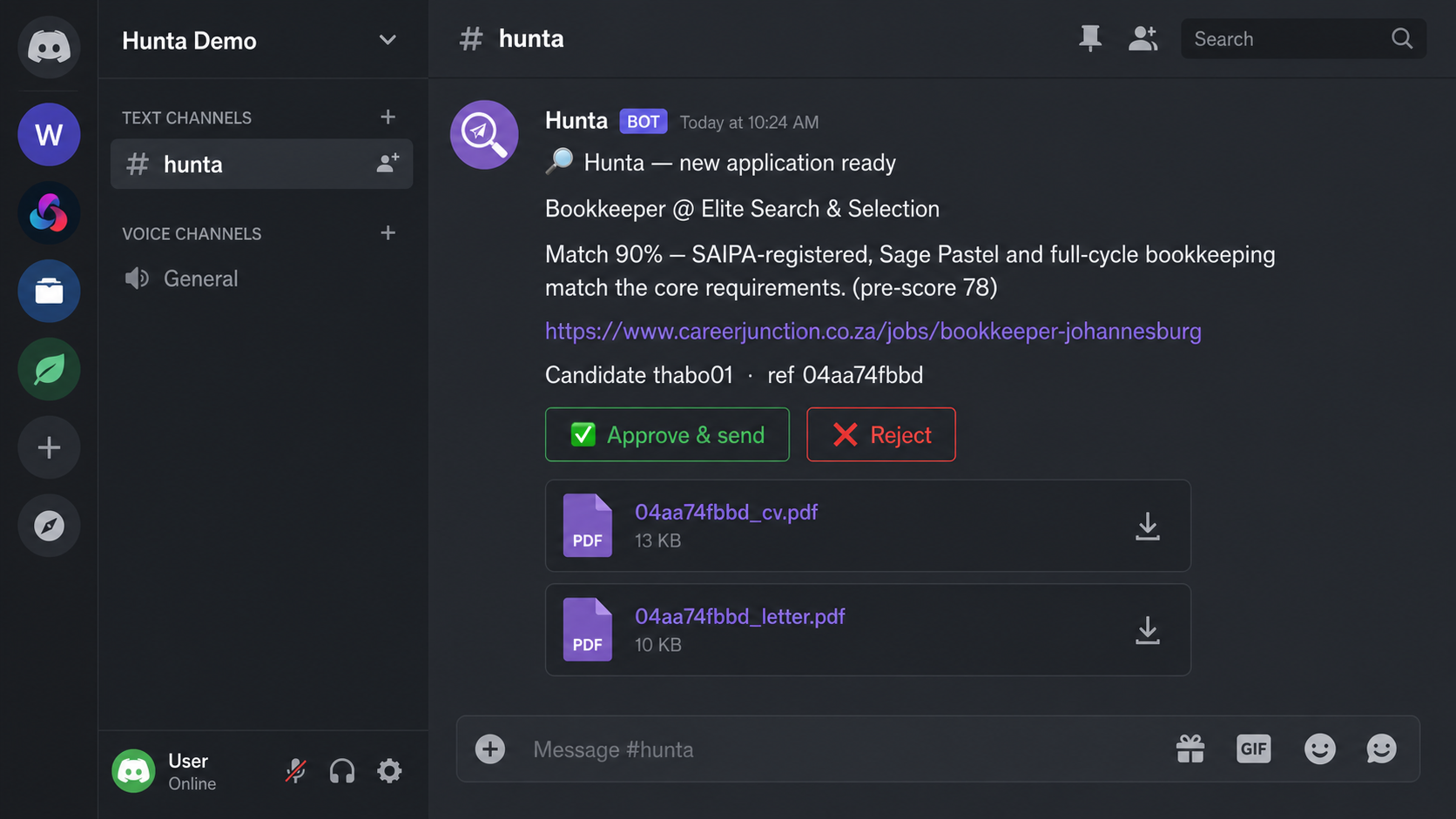
the card — real product screenshot (demo persona)
Tap around a live one right here — approve/reject logic runs in this page, no backend:
interactive card — the actual approve experience
5 Gmail: sending comes out of the candidate's own mailbox
- Candidate's Google account → security → 2-Step Verification ON → App passwords → create → 16 chars.
- Put
address:+app_password:intenant.yamlundermailbox:(app password goes throughhunta encryptlike the LLM key). hunta mailbox-test demo→ green means the pipeline can deliver. No Google Cloud project, no OAuth consent screen, nothing to pay.
6 First hunt
hunta hunt --dry         # previews; marks nothing, sends nothing
[hunter:careerjunction] 24 jobs
[hunter:pnet] 30 jobs
[pipeline:demo/lerato01] 32 pass rules, sending top 5 to LLM
[dry] Senior Accountant @ Meridian Logistics (pre 0.71 / llm 88%) -> Senior Accountant — Meridian…

hunta hunt               # real: drafts the PDFs, posts the cards, waits for your tap
18 board integrations across ZA · ZW · ZM + remote feeds, four times a day if you schedule it
(§10). A dead board never kills a run — [hunter:x] 0 jobs and the rest deliver.
7 The tap is the product
| ✅ Approve | sends from the candidate's Gmail within seconds; PDFs deleted, draft text wiped from the store |
| ❌ Reject | PNG… sorry — PDFs deleted on the spot, draft text wiped, job marked and never re-offered |
| Ignore | drafts self-destruct at 72 hours. Nothing you didn't act on survives a weekend |
There is no auto-send mode. It does not exist in the code, so no setting can turn it on.
8 CV design — chosen per candidate, applied on every draft
Your clients don't all want the same document. Four designs ship in the demo; each candidate picks one — the cover letter stays business-plain no matter what. All four are real text PDFs: ATS-parseable, no graphics, no columns a parser can't read.
Thabo Nkosi
Key Skills
Experience
Senior Accounts Clerk — Fake Corp 2021 – Present- Month-end pack cut from 9 to 4 days
- Cleared R2.1m aged debt, no write-offs
Thabo Nkosi
Key Skills
Experience
Senior Accounts Clerk — Fake Corp 2021 – Present- Month-end pack cut from 9 to 4 days
- Cleared R2.1m aged debt, no write-offs
Thabo Nkosi
Key Skills
Experience
Senior Accounts Clerk — Fake Corp 2021 – Present- Month-end pack cut from 9 to 4 days
- Cleared R2.1m aged debt, no write-offs
Thabo Nkosi
Key Skills
Experience
Senior Accounts Clerk — Fake Corp 2021 – Present- Month-end pack cut from 9 to 4 days
- Cleared R2.1m aged debt, no write-offs
the previews above use the product's own CSS; the linked PDFs are real render output
Three ways to set it
hunta designs                          # list them
hunta design demo lerato01 emerald     # CLI — one line, done
# or the YAML field in §3, or the dropdown in the dashboard's candidate settings —
#   cv design: [ classic ▾ ]   (classic · indigo · emerald · sunset)
Set it per client (a corporate-career person gets classic; a marketing graduate gets sunset), per country habit, per whatever your client asks for. Takes effect on the next draft; pending cards keep their original render until re-rendered on approve.
9 Where your data actually lives
One SQLite file per tenant — state/<tenant>.sqlite — holding job metadata, status and
the draft text only while it awaits your tap; the moment you approve or reject, the text is
NULLed and the PDFs are unlinked, and settled rows expire after 60 days. PDFs are born in a temp
folder and die at 72 h. Your Gmail app password and model key are Fernet-encrypted in the YAMLs.
Nothing phones home: no accounts, no analytics, no server of ours in the data path — self-hosted demo
means your laptop is the cloud.
10 Four times a day, if you want it
Demo mode: a scheduled hunta hunt via cron (Linux/Mac) or Task Scheduler (Windows):
# crontab -e — the 06:00/14:00 SAST rhythm (adjust TZ to yours)
0 4,12 * * 1-6  cd ~/hunta-demo && .venv/bin/hunta hunt >> hunt.log 2>&1
Paid hosted tier runs the same thing on GitHub Actions ($0 infra) for you — you never touch a scheduler.
11 When something looks wrong
| Symptom | What it is |
|---|---|
[llm] groq: 429 | free-tier rate limit. Naps are capped at 30 s then failover; run hunta llm-chain demo after exporting 2–3 free keys (cerebras, gemini…) to spread load. |
[pnet] detail path unhealthy — serving the rest from list data | board/DNS hiccup; the breaker keeps delivering ads from list data. No action; the next run retries normally. |
a board logs 0 jobs | that board is blocked from your IP or empty today. Coverage degrades, the run completes — always. |
DEMO limit: all 5 premium sends used | the 30-day leash. Reset goodwill: delete data/.demo_usage.json — or upgrade (§12). |
| everything times out on first run | free Groq key on a shared quota: it warms up. Every fetch has a hard 45 s budget — a run can idle, never hang forever. |
12 You're a coach and a client just said "I want this for everyone I have"
(For Hunta sellers: the same section in mirror — the bible's growth tab links here.)
- Take the order. Confirm: candidate count, countries, branding (Studio+). Solo $306/mo (about R4,999) = 3 candidates · 100 sends; Studio $613/mo (about R9,999) = 15 + white-label PDFs; Sovereign $920/mo (about R15,000) = self-hosted, unlimited. Annual prepay: $2,754 (Solo) / $5,517 (Studio) / $8,280 (Sovereign) — 25% off, one payment by bank wire. These are the actual prices everywhere: US dollars monthly, or pay in rands (R4,999 / R9,999 / R15,000 a month).
- Payment — Whop one-tap checkout is LIVE for every tier: in dollars (Solo
whop.com/checkout/ch_abZZn55zTTq9VO0, Studiowhop.com/checkout/ch_xXwDxquSJP2Ctwu, Sovereignwhop.com/checkout/ch_cjiffJE23bpi6Zx), in rands (Soloch_kx2q8S9aYZtNTbX, Studioch_DevT4v0Yys7JPUX, Sovereignch_kB1eviTd27jsJiv), and annual by bank wire (Soloch_k0iLW2DxBwPn7Pb, Studioch_2AqEEMTlrXveTzJ, Sovereignch_4gPHCzpXHl3jk6y). Storewhop.com/jacaranda-labs. Whop only takes cards up to $2,500, so annual is wire-only. Card payments run through Whop; every manual rail below is honoured in full too — Lightning to SharkSkin@coinos.io (LUD-16-verified 2026-09-19; payer puts name + tier in the payment note, receipt to WhatsApp), or Mukuru/EFT quoting their tenant id as the reference. Push annual prepay on every close ($2,754 Solo / $5,517 Studio / $8,280 Sovereign) — cash now beats MRR while the build is unfunded, and one payment removes a month of manual grant admin. Whop checkout for a new tenant: point them at the tier card on the store page. Never start the tenant until money landed (or the owner's manual-rail receipt came in). - Provision the tenant in seconds: copy the tenant template, add their candidates, encrypt their Gmail app passwords + their own LLM key (their key = their bill = their privacy), start their pipeline. A new paying tenant is a directory, not a deploy.
- Remove the leash: their build runs without
HUNTA_FLAVOUR=demo— that single env flip is the entire upgrade; queues, history and CV designs carry over untouched. - Self-host (Sovereign) customers: nothing to do by hand. After a Whop purchase they run
/claimin their own Discord; the bot opens a private #🔐-hunta-sovereign channel with their signed licence and the install steps below, and posts a fresh licence on every renewal. Manual-rail buyers:hunta licence-issuesigns one by hand. Support is/helpin that channel, WhatsApp as backup. - Week-one check: after 3 days ask for a screenshot of their first approved card. That moment is the product working; it's also your referral ask, made warm.
"Done — you're on [tier], [n] candidates live, sends start with your next hunt at [time]. Nothing about your demo changes: same pipeline, your keys, your mailbox, no leash. Your first CV designs are set per candidate — say the word if anyone wants a different look."
13 Sovereign: install Hunta on your own box
For Sovereign buyers. About 15 minutes on any Linux server, VPS or spare PC with Docker. Your licence is
in your #🔐-hunta-sovereign Discord channel (it appears after you run /claim). Stuck? Type
/help in that channel, or WhatsApp +263 78 460 0904.
- Get the image and the compose file.
mkdir hunta && cd hunta
docker pull ghcr.io/king-kunta-cpu/hunta:latest
curl -fsSLO https://gethunta.pages.dev/downloads/docker-compose.sovereign.yml
- Make two keys (run each once and keep the output):
docker run --rm ghcr.io/king-kunta-cpu/hunta:latest hunta keygen
docker run --rm ghcr.io/king-kunta-cpu/hunta:latest hunta admin-token
- Create
.envin the same folder:HUNTA_LICENCE_KEY=HLT1.paste-your-licence-here HUNTA_MASTER_KEY=the-keygen-output HUNTA_ADMIN_TOKEN=the-admin-token-output
- Start it and check the licence:
docker compose -f docker-compose.sovereign.yml up -d
docker compose -f docker-compose.sovereign.yml exec hunta hunta licence-status
It should print your firm name, the expiry date and "seats: unlimited". - Add your firm and candidates:
docker compose -f docker-compose.sovereign.yml exec hunta hunta tenant add my-firm --name "My Firm"
It prints the next steps (mailbox app password, AI key, candidates). Then runhunta doctorthe same way to confirm everything is green. The dashboard is athttp://your-box:8080; sign in with your admin token. Approvals go to Discord, the web dashboard, or Telegram (HUNTA_TELEGRAM_BOT_TOKENin.env). - Renewals: each payment posts a fresh licence in your Discord channel. Replace the
HUNTA_LICENCE_KEYline and rundocker compose -f docker-compose.sovereign.yml up -d. If a licence lapses, Hunta turns read-only (the dashboard still works; hunting and sending stop). It never deletes anything.